Payments
Y1 Game Withdrawal Guide: UPI Steps, Timing and Limits
Quick answer: To make a Y1 Game withdrawal, open the wallet, tap Withdraw, bind a UPI ID or bank account in your own name, enter an amount within your Withdrawable balance and confirm. The app's wallet tip says payouts are normally credited within about two hours but can take up to 24 hours.
Last verified: 15 September 2026 (bonus, version and app-screen details)
Withdrawing from Y1 Game is a short process once your payout account is set up correctly. Most problems come from details you can fix in advance: the name on your UPI ID, unfinished bonus wagering or a typo in your account details. Here is the full process, and what to do when money doesn't arrive.
How do I make a Y1 Game withdrawal?
You withdraw from the wallet screen in five steps. Labels can shift slightly between app builds, but the flow stays the same. If you can't get into the app at all, sort that out first with our y1 game login guide.
Open your wallet
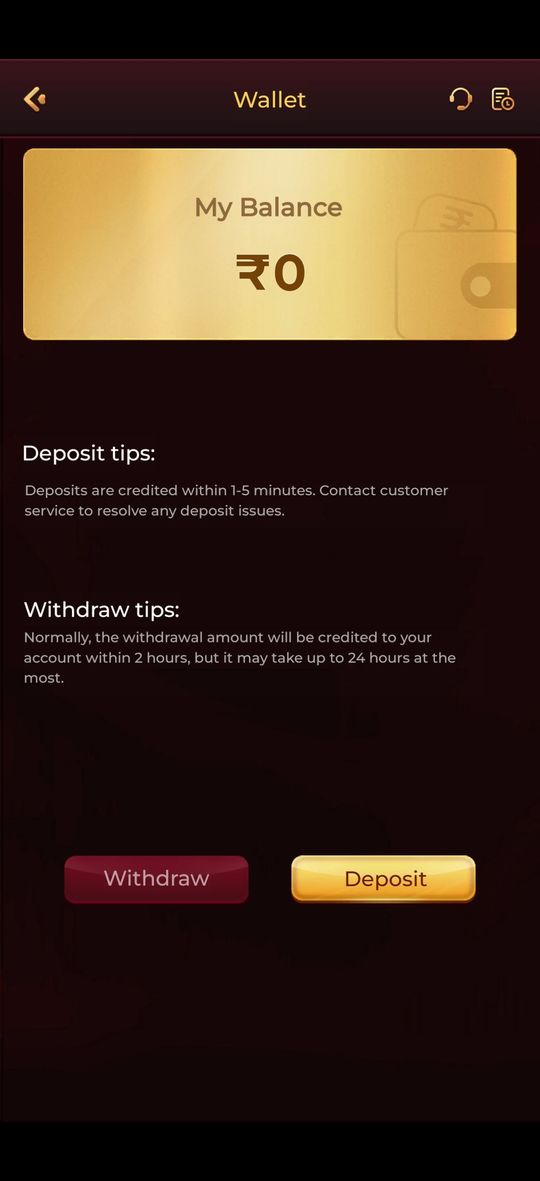
Tap the balance pill at the top of the home screen. The Wallet screen shows My Balance, Withdraw and Deposit buttons, plus deposit tips and withdraw tips.
Tap Withdraw
This opens the withdrawal form. Note the amount shown as withdrawable and any limits the screen displays for a single request.
Bind your UPI ID or bank account
On your first withdrawal, add a payout method. Enter a UPI ID or bank account registered in your own name, exactly as your bank holds it, and double-check every character.
Enter an amount within your withdrawable balance
Type an amount no higher than the Withdrawable figure and within the limits shown. Check whether a withdrawal fee applies at your VIP level before moving on.
Confirm and keep the record
Submit the request, then find it in your records, which open from the icon at the top right of the wallet screen. Take a screenshot of the order in case you need support.
Does my UPI or bank name need to match my account?
Yes, your payout account should be in your own name. Payment partners check names to prevent fraud, so a UPI ID belonging to a friend or relative is a common reason a Y1 Game UPI payout gets held.
The app may also ask for identity verification (KYC), for example before a first or larger withdrawal. If it does, use your own documents and keep the details consistent with your bank records. Don't open a second account to get around a verification request; duplicate accounts usually lead to a freeze, not a faster payout. If you're unsure whether the app itself is trustworthy, read our y1 game apk safe checklist before you deposit.
How long does a Y1 Game withdrawal take?
The app's own wallet tip says a withdrawal is normally credited within about two hours, but it can take up to 24 hours at most. That is the wording shown on the wallet screen when we checked on 15 September 2026. We can't guarantee timings, because they depend on the operator and its payment partners.
Several things affect how quickly money reaches you: your bank's UPI servers, bank holidays and late-night maintenance, whether your request is picked for a manual review and whether all bonus conditions are met. Give a request the full 24-hour window before you escalate it, and avoid submitting duplicates while one is still processing.
What are the Y1 Game withdrawal limits and fees?
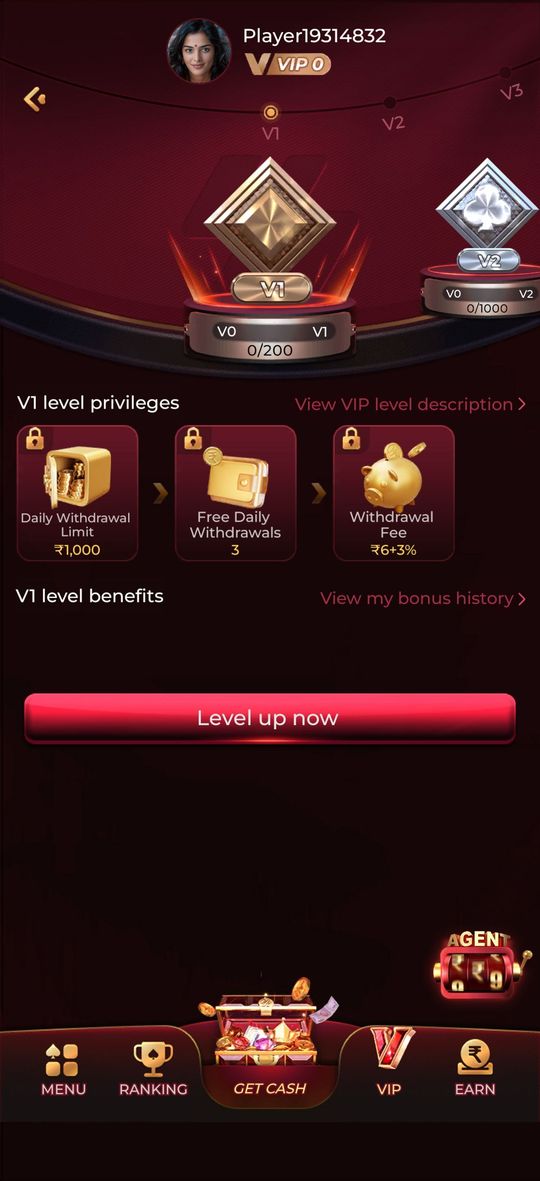
Withdrawal limits and fees depend on the app's current rules and your VIP level, so we don't quote fixed amounts that could go out of date. The VIP page lists privileges for each level, including a daily withdrawal limit, a number of free daily withdrawals and a withdrawal fee.
- Limits per request: shown on the Withdraw screen when you enter an amount.
- Daily withdrawal limit: listed as a VIP privilege, and it can differ between levels.
- Free daily withdrawals: how many requests per day your level includes without a fee.
- Withdrawal fee: the charge listed for your level; read the VIP level description to see how it is applied.
Tap VIP in the bottom bar, then View VIP level description, to compare levels. Your progress towards the next level appears as a bar on that page. Don't bet more than you planned just to unlock a higher limit.
What is the difference between Cash balance and Withdrawable?
Cash balance is all the money in your wallet; Withdrawable is the part you can take out right now. The deposit screen shows both figures side by side, and the gap between them is usually money tied to a promotion.
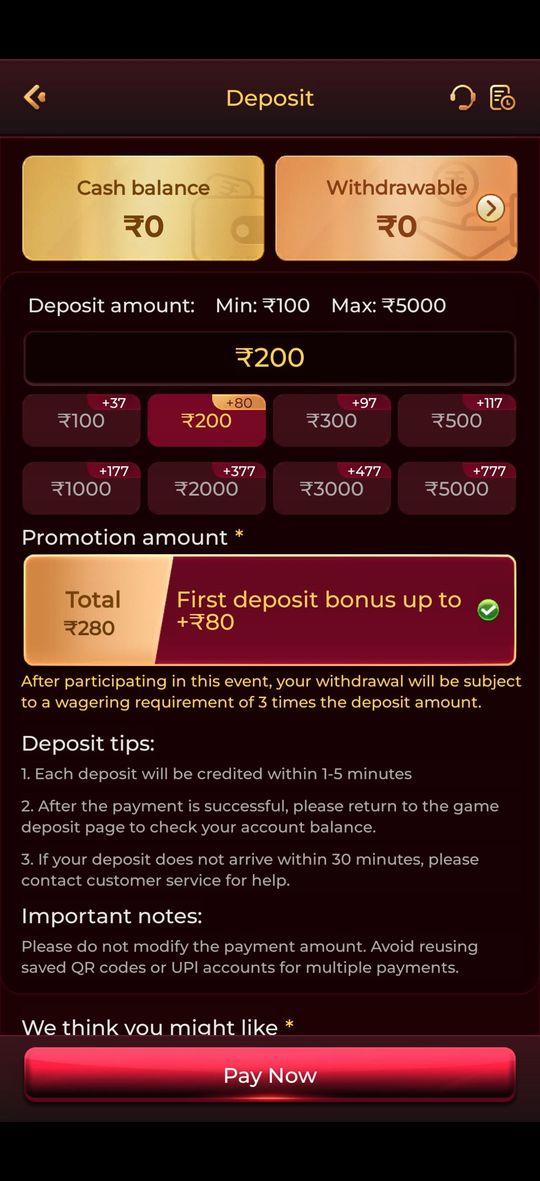
When you switch on a deposit promotion, the app notes that your withdrawal becomes subject to a wagering requirement. Until you've placed enough bets to meet it, that money stays out of the Withdrawable figure. Suppose, hypothetically, an offer required bets of 5 times a ₹200 deposit: you would need ₹1,000 in total bets before it unlocks. The real multiple is on the offer screen. The sign-up offer follows similar principles, explained in our y1 game 500 bonus guide.
Why is my Y1 Game withdrawal delayed?
A delayed withdrawal almost always has a specific cause you can check. Match your situation to this table before contacting support.
| Reason | What to do |
|---|---|
| Unfinished wagering on a bonus | Open the promotion's rules and check your progress. Only the Withdrawable amount can be paid out until wagering is complete. |
| Name mismatch on UPI or bank account | Bind a payout account in your own name. If a request is already stuck, contact in-app customer service. |
| Wrong or inactive UPI ID | Verify the ID in your UPI app, which should show your name. Correct it in Y1 Game, then ask support about the failed request. |
| Bank holiday or UPI downtime | Wait until the 24-hour window in the wallet tip has passed, and check whether your bank has announced UPI maintenance. |
| Risk or security review | Keep your order screenshot and respond to any verification request from customer service. Don't submit repeat requests. |
| Multiple accounts | Use only one account. Duplicate accounts break most platforms' rules and can lead to frozen balances. |
Which deposit habits prevent Y1 Game payment problems?
Clean deposits lead to clean withdrawals, because a payment that doesn't match its order can trigger reviews later. The deposit screen's own Important notes give two rules worth following every time, and a few more habits help.
- Don't edit the payment amount. Pay exactly what the order shows in your UPI app; a changed amount can leave the deposit unmatched.
- Don't reuse saved QR codes or UPI accounts from an earlier payment. Start a fresh order from the Deposit screen and tap Pay Now each time.
- Pay from your own UPI account, ideally the one you'll withdraw to, so names stay consistent.
- Return to the deposit page after paying and check your balance, as the app's deposit tips suggest. If it hasn't arrived, contact customer service with your UPI transaction reference (UTR).
- Look at the promotion toggle before paying. Only switch it on if you accept the wagering condition attached to that deposit.
Who do I contact about a withdrawal problem?
For anything specific to your account, contact in-app customer service through the headset icon at the top of the wallet and deposit screens. Only the operator can see your transactions, check a pending withdrawal or fix a failed one.
We run an independent guide site, not the payment system, so we can't view accounts or move money. We're happy to help with general questions, such as how the steps work or what an error message means, on Telegram.
If you're new, the y1 game overview and our y1 game download page explain where to get the genuine app. That matters for payments, because a modded copy can put your login and UPI details at risk.
Can anyone speed up my withdrawal for a fee?
Genuine delays are handled free through the app's own customer service. Whether your balance came from Teen Patti, Crash or a slot, the payout goes through the same wallet process described above.
Frequently asked questions
What is the minimum withdrawal on Y1 Game?
We don't publish a fixed minimum because the app sets it and it can change. The Withdraw screen shows the current limits for a request, and your VIP level affects the daily withdrawal limit. Check both screens before you plan a withdrawal.
Why is my Withdrawable balance lower than my Cash balance?
Cash balance is everything in your wallet, while Withdrawable is the part you can take out right now. Money linked to a promotion stays locked until its wagering requirement is met, so the two figures can differ. The deposit screen shows both side by side.
Can I withdraw to someone else's UPI ID?
You should not. Payouts are meant for an account in the player's own name, and a name mismatch is one of the most common reasons withdrawals are held or rejected. Bind your own UPI ID or bank account, and avoid changing it just before withdrawing.
Does Y1 Game charge a fee to withdraw?
It depends on your VIP level. The VIP page lists a withdrawal fee, a number of free daily withdrawals and a daily withdrawal limit as level privileges. Open the VIP tab and the Withdraw screen to see what applies to your account before you confirm a request.
My withdrawal is past 24 hours. What should I do?
First check the withdrawal record for its status and confirm your UPI ID or bank details are correct. Then contact in-app customer service with the order details, since only the operator can see your account. Never pay anyone who offers to speed up or unlock a withdrawal.