Guides
Y1 Game App APK Not Installing? Causes and Fixes for Every Error
Quick answer: When the Y1 Game app APK won't install, the cause is usually an old conflicting copy, a broken download, the Install unknown apps permission being off, a Play Protect block or low storage. Note the exact error message, match it to a fix below, and re-download from the official link if you're unsure.
Last verified: 15 September 2026 (bonus, version and app-screen details)
If the Y1 Game app APK is not installing, Android is almost always telling you why in the error message. Read it carefully, find it in the table below, and jump to the matching fix. Most problems take a couple of minutes to solve.
Before you start, make sure the file came from the official link on our y1 game download page. Many "won't install" cases turn out to be old or modified copies picked up from other sites. If you want to know more about the app itself, start with our y1 game guide.
Which install error do you have?
Use this table to match your message to the likely cause. Exact wording varies slightly between Samsung, Xiaomi, Realme, Vivo and other brands, so look for the closest match.
| Error message | Likely cause | Fix |
|---|---|---|
| "App not installed" or "package conflicts with an existing package" | An older or modified copy is already on the phone | Fix 1 |
| "There was a problem parsing the package" or "package appears to be invalid" | Incomplete or corrupted download | Fix 2 |
| "For your security, your phone is not allowed to install unknown apps from this source" | Install unknown apps is off | Fix 3 |
| "Blocked by Play Protect" or an unsafe app warning | Play Protect doesn't recognise the app | Fix 4 |
| "Not enough space" or "Insufficient storage" | Internal storage nearly full | Fix 5 |
| Download fails or stops partway | Unstable network, data limits or Wi-Fi switching | Fix 6 |
| "App isn't compatible with your phone" | Android version or CPU architecture mismatch | Fix 7 |
| Tapping the APK does nothing | File manager can't open APK files | Fix 8 |
| "Blocked by your admin" or "Action not allowed" | Work profile, parental controls or device management | Fix 9 |
Fix 1: Why does it say "App not installed"?
Cause: Android refuses to install over an existing app with the same package name that was signed by someone else. This happens when an older copy of the app from another site, or a so-called modded version, is still on your phone.
Fix: Open Settings → Apps, find the old Y1 Game app and tap Uninstall. If your phone has a second user, Dual Apps or a Secure Folder, remove the copy there too. Restart the phone, then install the fresh file from the official link.
Fix 2: What does "There was a problem parsing the package" mean?
Cause: The file is incomplete or damaged, usually because the download was cut off. It can also happen if a web page was saved with an .apk name, or, on very old phones, when the app needs a newer Android version.
Fix: Delete every Y1 Game APK from your Downloads folder, including duplicates ending in "(1)". Re-download on a stable connection and wait for the "download complete" notification before tapping the file. Don't rename it. If the error returns on an old phone, go to Fix 7.
Fix 3: How do you fix "Install blocked" for unknown apps?
Cause: Android grants the Install unknown apps permission separately to each app. If you opened the Y1 Game app APK from Chrome, Files by Google or WhatsApp, that specific app needs permission.
Fix: Tap Settings on the prompt, or go to Settings → Apps → Special app access → Install unknown apps, choose the app you used and enable Allow from this source. On recent Samsung phones, Auto Blocker under Security and privacy also stops installs from outside approved stores; switch it off, install, then switch it back on. Xiaomi phones may run a security scan with a short countdown first.
Fix 4: What should you do when Play Protect blocks the install?
Cause: Google Play Protect checks apps installed from outside the Play Store. It may block or warn about an app it hasn't seen before, or one that asks for sensitive permissions. A warning isn't proof of malware, but it isn't something to wave away either.
Fix: If you downloaded the Y1 Game app APK from the official link, tap More details and then Install anyway if that option appears. If the file came from a mirror site, a chat group or a stranger, stop and delete it. If Play Protect calls the app harmful or gives no install option, don't try to force it. Our y1 game apk safe guide explains how to judge these warnings.
Fix 5: How much free space do you need to fix a storage error?
Cause: Android needs room for the downloaded file plus extra space to unpack and install it, so a nearly full phone fails even if the APK itself fits. The file size is shown on the download page.
Fix: Open Settings → Storage and clear space generously. Delete large videos and WhatsApp media, uninstall apps you don't use, and use the Clean tab in Files by Google to remove junk and old APKs. Then try the install again.
Fix 6: Why does the download stop midway?
Cause: Switching between Wi-Fi and mobile data, weak signal, battery saver, data saver limits or an ad-blocking VPN can all interrupt a download. In-app browsers inside Instagram, Facebook or Telegram are also unreliable for file downloads.
Fix: Open the link in Chrome itself, stay on one network and keep the screen on. Track progress under ⋮ → Downloads in Chrome, where you can retry a failed download. If your phone restricts background data for Chrome, allow it under Settings → Apps → Chrome → Mobile data.
Fix 7: What if the app isn't compatible with your phone?
Cause: Your Android version may be below the app's minimum, which is shown on the download page. Less commonly, the build may not support your phone's processor type, which can happen on some x86 devices, emulators or very old 32-bit phones. Android 14 and later also block apps built for very old Android versions.
Fix: Check Settings → About phone and install any pending system updates. Make sure you have the current file from the official link, not an old copy. Our y1 game for android guide covers requirements in detail. If your phone is simply too old, a newer device is the only real fix.
Fix 8: What if your file manager can't open the APK?
Cause: Some preinstalled file managers and gallery apps don't hand APK files to Android's installer, and nothing happens when you tap. Sometimes the file also saved with the wrong extension, such as .bin or .zip.
Fix: Install Files by Google from the Play Store, open Browse → Downloads and tap the APK there, allowing Files to install unknown apps. If the extension is wrong, download again through Chrome rather than renaming it.
Fix 9: Why does it say "Blocked by your admin"?
Cause: Company-managed phones, work profiles, school devices and Family Link supervision can all block apps from unknown sources. The unknown apps toggle is then greyed out.
Fix: If you have a work profile, open the APK from your personal profile, not from apps marked with a briefcase badge. On a company-owned phone, respect the policy and use your own phone. Family Link supervision is mainly used for children, and Y1 Game is strictly 18+, so we won't help work around parental controls.
Still not installing? What should you do next?
Restart your phone, re-download on a different network, and go through the table once more. If the Y1 Game app APK still refuses to install, message us with your phone model, Android version and a screenshot of the exact error.
We will never ask for your OTP, password or UPI PIN, and nobody genuine will. Once the app opens, you should see the side menu below.
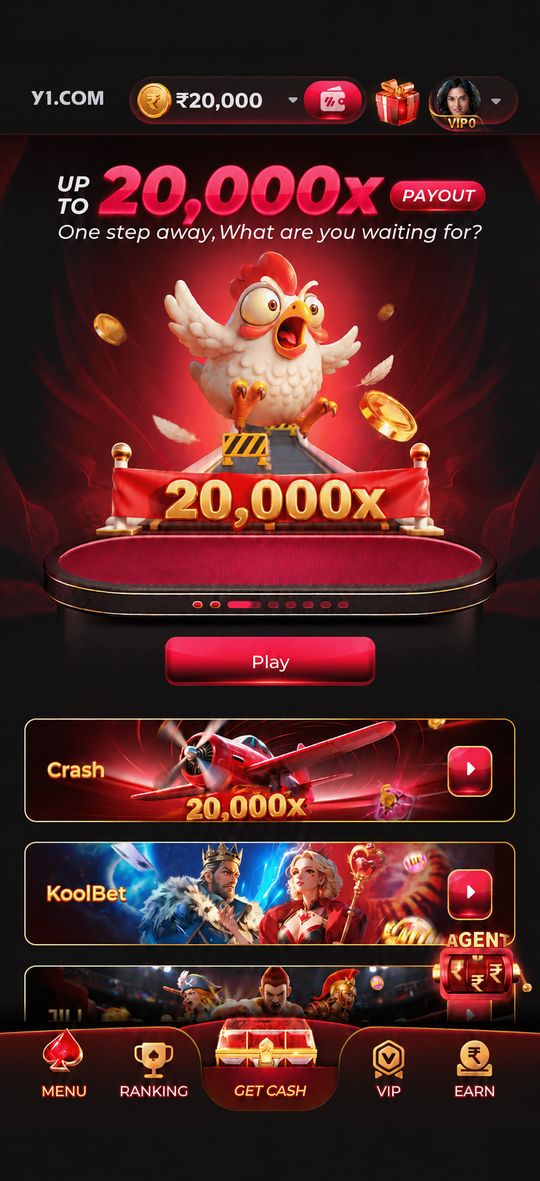
From there, a quick game like Crash or Teen Patti is an easy way to check everything loads. To avoid repeat problems, install future builds from the same official link; our y1 game apk latest version post explains how to update safely.
Frequently asked questions
Will I lose my Y1 Game account if I uninstall the app?
Your account is linked to your registered mobile number, not to the app file on your phone, so uninstalling the app does not delete it. After reinstalling, log in with the same number. Keep a note of your login details before you uninstall, just in case.
Why is the Install button greyed out or not responding?
A dead Install button is often caused by a screen overlay such as a blue-light filter, chat bubbles or a floating screen recorder. Android can block taps on install screens while something is drawn over them. Turn those off, reopen the APK and try again.
Should I use an APK installer app from another website?
Avoid it. Third-party installer or APK booster apps add another unknown app to your phone and can bundle adware. Android's own package installer, opened through Files by Google or your phone's file manager, is all you need to install the Y1 Game APK.
Can I install the APK with a VPN switched on?
A VPN doesn't affect the install itself, which happens entirely on your phone, but it can slow or interrupt the download and stop some links opening. If the download keeps failing, switch the VPN off, download on a stable connection, then install as normal.
My phone says the app is installed but I can't find it. Where is it?
Check the app drawer rather than the home screen, because some launchers don't add new icons automatically. Search for Y1 in the drawer, or open Settings, then Apps, and look for it in the list. If it's there, open it and add a home screen shortcut.